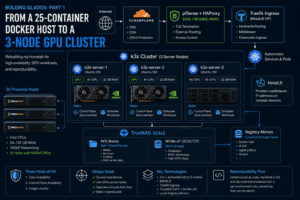
When I rebuilt my Docker homelab as a three-node k3s cluster, one of the requirements was reproducibility.
The Kubernetes nodes are Ubuntu VMs running on Proxmox. I needed three nodes initially, with the possibility of adding a fourth later. Installing and configuring Ubuntu manually on every VM would work, but it would also make it easy for the nodes to drift apart over time.
Instead, I built a Proxmox golden template.
The goal was straightforward: clone the template, provide the node-specific configuration through cloud-init, boot it, and have a consistent Ubuntu VM ready to become a k3s node.
The finished process involved more than creating an Ubuntu cloud image. There were cloud-init cloning quirks, network interface renaming, storage prerequisites, registry configuration, and a few things that only became obvious when Kubernetes started scheduling real workloads onto freshly cloned nodes.
The two GPU-equipped nodes also needed NVIDIA drivers installed after cloning. With Secure Boot enabled, which introduced DKMS and MOK enrollment into the process.
Why use a template?
The k3s nodes are intended to be replaceable compute.
Persistent application data lives on TrueNAS. Kubernetes workloads aren’t supposed to depend on a particular VM continuing to exist. If I lose a node or decide to replace one, rebuilding the VM shouldn’t involve trying to remember everything I configured on the previous one.
The template provides the common operating system baseline, while cloud-init supplies configuration specific to each clone.
                 Ubuntu template
                       |
          +------------+------------+
          |            |            |
          v            v            v
       k3s-01       k3s-02       k3s-03
       Ubuntu       Ubuntu       Ubuntu
          |            |            |
          +------------+------------+
                       |
                       v
                  k3s cluster
Anything I repeatedly configure by hand after cloning is something I need to consider moving into either the template or the provisioning process.
That became increasingly obvious as I started building nodes from it.
Building the base VM
I built the template using Proxmox’s qm tooling rather than creating the VM interactively through the UI.
The VM uses UEFI through OVMF, a cloud-init drive, a SPICE display, and a primary disk on my NVMe-oF-backed Proxmox storage.
I deliberately keep SPICE enabled because I like having graphical console access available if something goes wrong. Most of the time I don’t need it, but a VM console is one of those things that’s useful to have before the operating system or network is working.
The basic VM configuration follows this pattern:
qm create <vmid> \
  --name ubuntu-template \
  --memory <memory> \
  --cores <cores> \
  --cpu host \
  --bios ovmf \
  --machine q35 \
  --agent enabled=1
The exact storage, networking, and sizing arguments depend on the environment, but the result is an Ubuntu cloud image that gets its node-specific configuration from Proxmox through cloud-init.
I also use growpart so the filesystem can be expanded online when a clone’s virtual disk is resized.
The intended provisioning process is roughly:
Clone template
      |
      v
Configure hostname, network, SSH key
      |
      v
Resize disk if necessary
      |
      v
Boot
      |
      v
cloud-init
      |
      v
Configure/join k3s
The actual process accumulated a few additional steps.
The first-boot network problem
One of the first problems appeared immediately after cloning.
The template’s cloud-init configuration renames the network interface. On the first boot of a new clone, that rename could fail because the interface was busy. Instead of coming up with the intended network configuration, the VM would land on DHCP.
A reboot fixed it.
On the subsequent boot, netplan could perform the rename during the normal udev stage, and the expected configuration applied correctly.
That made the provisioning sequence effectively:
Clone
  |
  v
First boot
  |
  +--> interface rename fails
  |
  +--> DHCP
  |
  v
Reboot
  |
  v
interface rename succeeds
  |
  v
expected network configuration
It wasn’t a major problem once I understood what was happening, but it was initially confusing because the cloud-init configuration itself looked correct.
It also meant that a successful first boot wasn’t necessarily the end of network provisioning for a fresh clone.
The cloud-init drive wasn’t actually independent
The more significant clone-time problem was the cloud-init drive itself.
I expected a cloned VM to receive its own cloud-init volume.
Instead, the clone’s ide2 could continue pointing at the template’s cloud-init volume rather than receiving an independent one.
That’s particularly easy to miss because everything else about the clone looks normal.
Checking the VM configuration makes the problem visible:
qm config <vmid>
The workaround after cloning is to remove the existing cloud-init drive and create a new one for the clone:
qm set <vmid> --delete ide2
qm set <vmid> --ide2 <storage>:cloudinit
Proxmox can then generate cloud-init data specifically for that VM.
This became part of my normal clone procedure rather than something I assume Proxmox has handled automatically. For most people, this is a non-issue as Proxmox handles the work properly. In my case, it is a known bug with my storage plugin that is being addressed.
--sshkeys had a node-local surprise
Another issue appeared when supplying the SSH public key through qm.
The --sshkeys operation only worked correctly when I ran it from the Proxmox node that actually owned the source VM.
That’s not a distinction that exists on a standalone Proxmox server, but it matters when automating VM creation across a multi-node cluster.
The Proxmox management plane is clustered, but that doesn’t mean every part of a VM provisioning workflow is completely location-independent.
Installing NVIDIA drivers on the GPU nodes
Two of the three k3s nodes have NVIDIA GPUs passed through from their Proxmox hosts.
The NVIDIA drivers aren’t installed in the golden template. They’re installed after cloning on the nodes that actually have GPUs.
That keeps the common Ubuntu image common. A node without a GPU doesn’t need an NVIDIA driver just because another node does.
The GPU nodes use Secure Boot, so installing the NVIDIA driver also involves DKMS and MOK enrollment.
The sequence is roughly:
Clone VM
   |
   v
Install NVIDIA driver
   |
   v
DKMS builds kernel module
   |
   v
Reboot
   |
   v
MOK enrollment
   |
   v
NVIDIA module loads
MOK enrollment happens during the installation/reboot process. Because these VMs already have SPICE graphical consoles available, I could interact with MokManager during the reboot and complete the enrollment.
This ended up being a good example of why I prefer keeping graphical console access on the VMs even though I rarely need it. An SSH connection isn’t much help when the machine is sitting in a pre-boot UEFI interface waiting for input.
The NVIDIA driver itself remains an intentional post-clone difference between GPU and non-GPU nodes rather than something baked into the common image.
Kubernetes found the rest of the missing prerequisites
Once the VMs were running and joining k3s, workload scheduling exposed another category of problems.
A newly created node could join the cluster successfully and appear healthy while still being unable to run some of the workloads already running on the other nodes.
Several of those failures looked almost identical from Kubernetes:
ContainerCreating
followed by events containing:
FailedMount
The underlying causes were different.
Each one represented something I’d configured on an earlier node but hadn’t yet made part of the common provisioning process.
NVMe/TCP kernel modules
My block-backed Kubernetes persistent volumes use NVMe-oF storage from TrueNAS.
For a node to attach those volumes, the host kernel needs the relevant NVMe fabrics modules:
nvme-tcp
nvme-fabrics
Loading them manually fixes the immediate problem:
modprobe nvme-tcp
modprobe nvme-fabrics
but manually loading them isn’t sufficient for a node that’s supposed to be reproducible.
They need to persist across boots, so they’re loaded through /etc/modules-load.d/.
One useful distinction here is that nvme-cli itself doesn’t need to be installed on the host for my CSI setup. The utility exists in the CSI node plugin. The host needs the kernel functionality required to establish the NVMe/TCP connection.
That’s exactly the kind of host dependency that’s easy to forget after the first node is working.
NFS mounts need host support too
Other workloads use NFS-backed RWX volumes.
A fresh Ubuntu VM didn’t have the NFS client packages needed to mount them.
The Kubernetes side of the failure looked like:
mount failed: exit status 32
The host-side fix was simple:
apt install nfs-common
Again, the fix itself wasn’t difficult.
The problem was consistency.
If two Kubernetes nodes have nfs-common installed and the third doesn’t, the scheduler has no inherent knowledge of that difference. A workload can run successfully on one node, be rescheduled to another, and then fail to mount its storage.
NFS client support, therefore, became part of the common node baseline.
The registry configuration is node-local
I use local pull-through registry mirrors, so large container images don’t have to be downloaded from the Internet again every time a workload moves to a node that doesn’t already have the image.
That configuration is local to each k3s node.
containerd gets the mirror configuration from:
/etc/rancher/k3s/registries.yaml
A new node without that file doesn’t necessarily fail. It can still pull directly from the upstream registries.
That makes this type of configuration drift easier to miss.
The node works; it just behaves differently.
Instead of pulling a cached image over the LAN, it goes back to the public registry. For the ML workloads in the cluster, where the combined images can reach tens of gigabytes, that difference is significant.
The registry configuration therefore belongs in node provisioning too.
There was also a small ordering problem: /etc/rancher/k3s doesn’t necessarily exist yet when provisioning tries to write registries.yaml, particularly with the environment-variable-style k3s installation I was using.
So the provisioning process needs to create the directory before trying to place the configuration file there.
Image pruning has to follow the node too
The registry mirrors let me be relatively aggressive about cleaning up node-local container images.
I run a nightly image-prune timer so old images, particularly large ML images, don’t gradually consume the node’s local disk.
That’s another configuration that’s easy to forget once it’s working.
If I configure the timer manually on the first three nodes and add a fourth six months later, nothing immediately tells me that the new node is missing it.
It just slowly consumes more disk space than the others.
The timer, therefore, belongs in the reproducible node configuration alongside the registry mirrors.
k3s bootstrap configuration matters too
The k3s configuration itself needs to account for the fact that the control plane is supposed to be highly available.
With three k3s server nodes, I don’t want every node permanently configured around the IP address of one particular server.
That would introduce a bootstrap dependency on a single machine, even though etcd and the Kubernetes control plane can otherwise tolerate losing one server.
The API VIP and the appropriate TLS SANs, therefore, need to be included in the join/provisioning configuration.
This also isn’t something I want to solve by manually editing a generated k3s systemd unit.
A manual modification that disappears during an upgrade isn’t a durable configuration. If a setting is required for the node to function correctly, it needs to come from the provisioning process.
What actually belongs in the common baseline
By the time the nodes were behaving consistently, the common baseline covered considerably more than simply having the same Ubuntu image.
| Requirement | Purpose |
|---|---|
| UEFI / OVMF | VM firmware configuration |
| SPICE console | Graphical console access when the OS or network isn’t available |
| cloud-init | Per-node identity, networking, and initial configuration |
growpart | Online filesystem expansion |
nvme-tcp / nvme-fabrics | NVMe-oF-backed Kubernetes volumes |
nfs-common | NFS-backed RWX volumes |
registries.yaml | Local container registry mirrors |
| Image-prune timer | Controls node-local container image usage |
| k3s API VIP configuration | Avoids a bootstrap dependency on one server |
| k3s TLS SAN configuration | Allows the API to be accessed through the intended addresses |
The GPU-equipped nodes then receive their NVIDIA drivers after cloning.
That’s an important distinction.
Reproducibility doesn’t mean every node contains exactly the same software. It means the common baseline is consistent and the differences between nodes are intentional.
A GPU node having an NVIDIA driver while a non-GPU node doesn’t isn’t configuration drift.
One node being able to mount NFS volumes because I happened to install nfs-common manually six months ago is.
Kubernetes can’t describe everything underneath it
One of the more useful lessons from building the template was how much Kubernetes still assumes about the machine underneath it.
A PersistentVolume can describe storage backed by NFS, but it can’t make nfs-common appear on the node.
A StorageClass and CSI driver can provision an NVMe-oF volume, but they can’t make a missing nvme-tcp kernel module exist.
containerd can use a registry mirror, but only if the node has been given the correct registries.yaml.
A pod can request:
resources:
  limits:
    nvidia.com/gpu: 1
but that doesn’t install a functioning NVIDIA driver underneath Kubernetes.
The scheduler operates on the resources and capabilities the node exposes. Making those capabilities consistent is still a node-provisioning problem.
A template is a checklist you can’t forget
I originally built the Proxmox template because manually setting up the same operating system three times seemed unnecessary.
The bigger benefit turned out to be removing memory from the provisioning process.
Most of the individual problems I encountered were easy to fix once I knew what they were.
Install nfs-common.
Load nvme-tcp.
Create registries.yaml.
Recreate the cloud-init drive after cloning.
Install the NVIDIA driver on GPU nodes and complete MOK enrollment from the SPICE console.
None of those steps is particularly complicated.
The difficulty is remembering all of them when creating another node months later.
That’s now the test I use when deciding whether the node provisioning process is complete:
If I have to SSH into a newly cloned node to make it work like the others, there’s still something missing from the template or provisioning process.
Sometimes the correct place for that configuration is the golden image. Sometimes it’s cloud-init. Sometimes, as with the NVIDIA driver, it’s an intentional post-clone step that applies only to certain nodes.
What matters is that the process is defined.
The fourth node should behave like the first three, even if I build it six months later and no longer remember every problem I encountered while building them.